Getting Started
Ensure MetaHuman Core data is installed with the Engine
Install Unreal Editor 5.6 or newer alongside Metahuman Core via the drop-down arrow next to the launch icon within the Epic Games launcher and select options to install additional core engine assets.

Enable Plugins
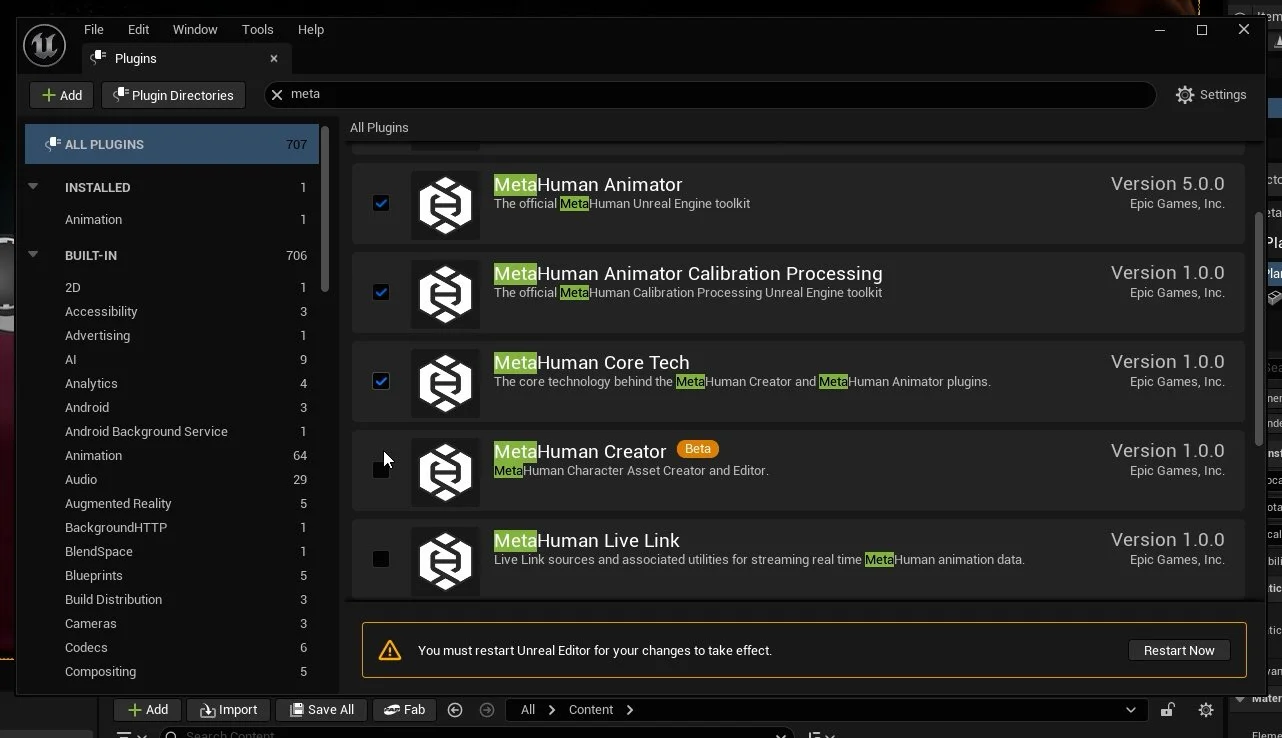
To enable the Metahuman creator in the Unreal Editor, we will need to enable several built-in plugins in Unreal 5.6+. This can be done via the Plugins panel within Unreal Editor, Edit > Plugins.
You will need to enable the following plugins:
Apple ARKit
Apple ARKit Face Support
MetaHuman Animator
MetaHuman Animator Calibration Processing
MetaHuman Core Tech
MetaHuman Creator
MetaHuman Live Link
MetaHuman SDK
After enabling these plugins, you will need to click on the Restart Now button, which will relaunch the editor. Some of these plugins will have warnings, as some features are in Beta at the time of writing this guide.